Tag: networking

  • Intermittent routing issues – the sequel

    This is the second part of this troubleshooting story and it’s probably missing quite a bit of context. Context can be found in the first part.

    Admittedly, memories of my high-school biology classes are a bit fuzzy. The birds and the bees, the tortoise and the hare, the cats and the butterflies, all sorts of fascinating things happening on the open plains, on the other side of the great firewall.

    When the butterfly caught a lion or a leopard, its egg would start growing in the apple, and the apple would start to rot from the inside. To be fair, that does also happen to all apples in due course, but the worm certainly does not help. Rotten apples and open windows. The perfect combination for the fast worms and the evil butterflies have a field day.

    Firewalls in general do a reasonably good job keeping them out. Where there’s a firewall however, there is always a crack, and the older the firewall, the bigger the crack is likely to be. It becomes a numbers game and the more firewalls they can check, the more likely they are to find a crack.

    One way to slow them down, is apparently tarpits. I don’t quite see how tarpits would slow down butterflies, but it does make sense for worms. I also don’t quite see how tarpits don’t outright kill the worms but it seems they have developed the ability to wiggle their way free.

    Can I do enterprise tricks with entry level gear?

    For the greater good, a few years back, I also set up a tarpit on my firewall. Every second those wiggly things wasted in my tarpit waiting for an answer, would be a second they didn’t spend searching for cracks elsewhere. I could spare a few CPU cycles.

    Until one day a particularly smart, or particularly stupid, kind of worm happened upon my firewall. “I got a crack!” it called out to its mates, before it even realised it was in a tarpit.

    That didn’t really matter. What did matter was that a whole blooming swarm answered the war cry and within minutes, I had thousands of connections open and tarpitted. My firewall’s poor little 600MHz MIPS processor was overwhelmed and unable to keep up.

    The problem

    I value the greater good and I like to think I do a lot of things towards it. There are limits however. When the greater good causes my better half’s internet connection to fail, that interferes with my “personal good”, and we can’t have that. As a compromise, I set up a blacklist on the back of the tarpit.

    On the first attempt: “You would like to access a closed port? Let me make a note of your IP address and come right through to the pit here”. On subsequent attempts: “You’re on the list already. I’m not wasting any more CPU cycles on you. Talk to the hand.”

    This worked great for years, or so I thought. In hindsight, it’s been giving me minor trouble for some time, as I was already suspecting. Did something change? Why was the problem so much more obvious all of a sudden?

    I want to say QUIC, the UDP based protocol that is becoming more and more prevalent these days. That however would imply that QUIC is to blame, which is absolutely wrong.

    The problem was my simplistic blacklist handling. A single packet, on a closed port, without an existing connection, would land an IP address on the blacklist for 15 minutes and all traffic from that IP would be dropped during that time.

    The theory, maybe

    Here are some assumptions on why this was happening. I have not done any extensive testing.

    TCP is more resilient to rogue packets arriving late. The TCP connection is, after all, established and terminated using well defined handshakes that firewalls recognise and use to keep track of open connections.

    UDP on the other hand is stateless and firewalls the world over, try to guess what constitutes an open connection. The vast majority of them go by time since last traffic. Mine considers the connection closed 10 seconds after the last received packet.

    Ironically, cutting down on the time spend on handshakes is the biggest touted advantage of QUIC.

    Because of this, I assume TCP connections, while certainly not immune to the problem, are far less likely to be affected than UDP ones. QUIC is also becoming more popular and that could explain the rise in occurrences.

    I still have no explanation why the outages would come in batches but the fact that they were not constant, leads me to believe that and some kind of service rollout process is causing delayed packets.

    Leave it to me to amplify a late packet to a full blown 15 minute service outage. How’s that for five nines?

    OK, now what?

    With the problem identified, the remaining question was what to do about it. There were three options that I could think of:

    Disable the blacklist. I didn’t want to do that because of the warm and fuzzy feeling it provides, knowing that each IP address can make one effective attempt at my firewall every 15 minutes. It would also mean that I my tarpit would be susceptible to flooding again.

    Implement an n-layer blacklist. Don’t blacklist IPs on the first packet, blacklist them on the nth. This would reduce the problem but it would not eliminate it. n+1 rogue packets would still land a perfectly good IP on the blacklist. Every larger n value would reduce the chance of that but would also diminish the purpose of the blacklist.

    Implement a whitelist or to be more precise, a blacklist-bypass list. If a device on the LAN side tries to connect to an IP on the blacklist, the same IP is added to a whitelist. This does not mean that all firewall rules are bypassed, it only means that the blacklist entry for that IP address is ignored and all packets and have to go through the normal rules.

    The verdict

    The whitelist seems to work well so far. I got a scare a few days back when the firewall got overwhelmed by traffic, and should perhaps run a few tests to make sure I didn’t mess up the firewall’s hardware offloading. Those can wait until I get another scare sometime in the future, probably far enough, not to remember what I changed to break it.

    All in all, an interesting puzzle to solve. Who would have thought that a blacklist implemented to slow down attackers would somehow catch websites whose packets were sent the long way around.
  • Troubleshooting intermittent routing issues

    Quite some time ago, I started noticing random websites failing to load at random times. No real pattern to it. No obvious reason but also no lasting effects. Refresh a few minutes later and everything was back to normal.

    My browser? My network? Their network? All the new fancy cloud related technologies? Asynchronous microservices, serverless functions, NoSQL databases, ephemeral instances and everything else that happens when IT people decide to bring their commitment issues to work…

    There certainly were enough new technologies appearing. Too much scrumminess and agility up in the air. Way too much continuous integration, all the way to the back of the developer’s envelope. Teething trouble I thought…

    Looking at Firefox’s Network Monitor (Ctrl+Shift+E), the main culprits back then were fonts from fonts.googleapis.com and javascripts from one of the gstatic.com domains. Great! The undercover tracking “cookies” were now causing random sites to fail when unavailable. I blamed it on failing CDNs at the time and moved on as the problem gradually went away by itself.

    I may be connecting dots that were never there but some time later, google services would stop responding at times and I assumed the issue was back. Google search, google chat and youtube, all would randomly just stop working.

    The troubleshooting equations started with time and service as parameters. User, device and program were added very soon after. It started with the classic “works for me” responses and escalated to Cluedo style reports. “Google, on the laptop, with Edge is broken again.”

    Down the wrong rabbit hole

    I misinterpreted my trusty Firefox Network Monitor, which showed NS_BINDING_ABORTED errors. Those happen when the user is too impatient and clicks all over the place. Instead I assumed that the NS part meant DNS issues because of course, it’s always DNS.

    Was it Pi-hole? Was the Pi 2B finally dying? Or the 10 year old SD card? Is the latest version finally reaching the hardware limits? Am I even running the latest version?

    So many questions, one simple way to answer them all. Set up an instance in a Proxmox CT, sit back and wait. Did I mention that this process involved A LOT of waiting? The beauty of intermittent problems…

    Well, that didn’t fix it. I very briefly tried running without an ad blocker but that was not an acceptable option, especially not for a long waiting test. I tried AdGuard Home but that didn’t fix it either.

    I tried both Pi-hole and AdGuard with a combination of upstream DNS servers (ISP, google, quad9) as well as a local Unbound instance. Nothing made any difference. combinations returned the same results to the client so I went back to Pi-hole on the Pi 2B.

    At least I ended up with an upgrade to Trixie and valid repositories again. I also kept the Unbound instance, running on the same Pi, because why not add yet another potential point of failure in the chain.

    I was starting to suspect that this time it may actually not be DNS. I don’t know if that has ever happened before but I’m pre-emptively gonna claim first!

    It was around this time that I also started paying attention to the fact that NS_BINDING_ABORTED is not a DNS related issue.

    A more systematic approach

    One of the biggest pains in troubleshooting this, was that by the time I noticed, the time it took me to get annoyed and the time I tried to investigate, I only ever got a few minutes before the problem disappeared.

    I somehow realised that a simple ping was not a representative test to check connectivity to www.google.com. Ping (the program) selects one of the 8 IP addresses at random. So do all other programs, and if they don’t, DNS seems to return the results in random (maybe round-robin?) order.

    Did I mention that www.google.com has 8 A records? So does www.youtube.com. Some sort of redundancy I guess and a natural, external load balancer…

    dig www.google.com
    ...
    ;; ANSWER SECTION:
    www.google.com. 706 IN A 142.251.150.119
    www.google.com. 706 IN A 142.251.155.119
    www.google.com. 706 IN A 142.251.156.119
    www.google.com. 706 IN A 142.251.157.119
    www.google.com. 706 IN A 142.251.153.119
    www.google.com. 706 IN A 142.251.154.119
    www.google.com. 706 IN A 142.251.151.119
    www.google.com. 706 IN A 142.251.152.119

    I soon was able to confirm that whenever I was having trouble with a service, at least one of the IP addresses was not reachable. No ICMP responses, no traceroute, no response to an http request nothing.

    I needed a way to check this without having to very quickly type ping commands and it would certainly help to keep track of when it happens, how often and how long it lasts.

    Gatus

    Gatus to the rescue! I don’t know much about their hosted service. I needed to monitor google from my location so I went with a local docker instance and boy, has it delivered! Here is a gist of the config I used to simply ping the 8 IP addresses every minute.

    Is it still a plug if I praise someone else’s service? Who cares. I’m happy with the few features that I have used so far and I will most certainly be looking at it further. That feature list looks impressive!

    Any conclusions?

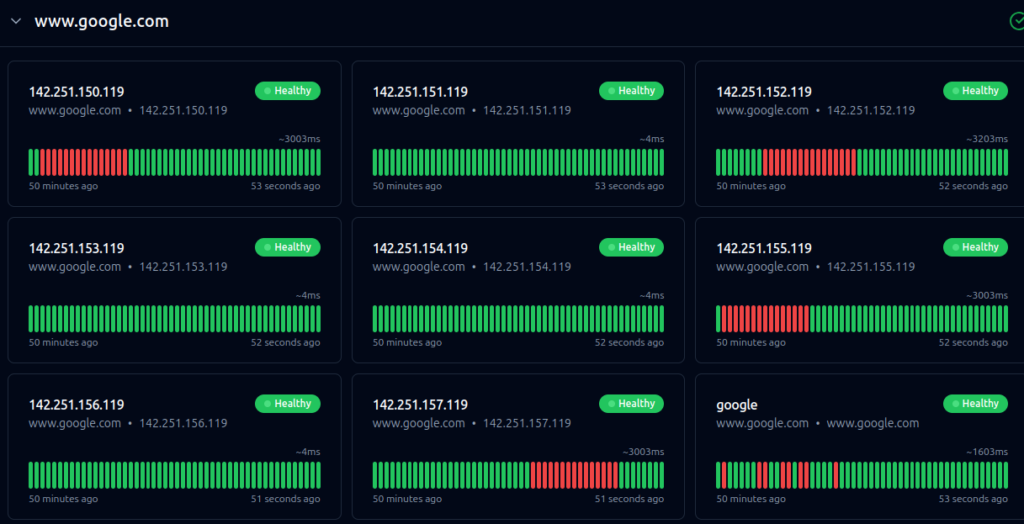
    What have I found out so far? Well, I’m not going (completely) mad. The red bars do exist but that’s as far as the insight goes for now.

    • They last a VERY consistent 15 minutes
    • They don’t seem to be random. Sometimes it’s all fine for a couple of days, sometimes they happen multiple times a day.
    • The outages by IP, seem to be (loosely) connected. Quiet days are quiet across the board. On busy days the outages seem to happen in sequence.
    Gatus dashboard from 22 September 2026
    Gatus dashboard from 22 September 2026

    If it was any other website or service, I would argue that their service rollout process is to blame, or their network update process, or their failover process or something along these lines.

    We are talking about google services however. That’s the part that does not compute. It’s not that they don’t have youngsters that very enthusiastically push the wrong button. It’s that if a technician has beans in the evening, the news reports “excessive methane levels in the data centre” the next day. It could be my ISP but then it would be the national news instead…

    That leaves 2 options. Either the issue is indeed on the side of my ISP but only affects a small subset of users, my network “neighbours” so to speak, or the issue is in my own network.

    More data is required and more may soon be coming. I’ve asked the question on my ISP’s community forum and people have already offered to monitor from their own connections. There will probably be a 2nd part to this with further findings.

    Alternate theory

    There is of course a slight chance that they intentionally bury all the google outage reports from the search results. That means that yet another one of my conspiracy theories has been confirmed and this blog will never be popular now.

    Anyone getting to find and read this entry constitutes and actual paradox and I need to stop writing and go find my tinfoil hat at once. So long and thanks for all the fish!